> ## Documentation Index
> Fetch the complete documentation index at: https://docs.trychert.com/llms.txt
> Use this file to discover all available pages before exploring further.
# Overview
> Managed 2GP package that sends iMessage from Lead, Contact, and Account records.
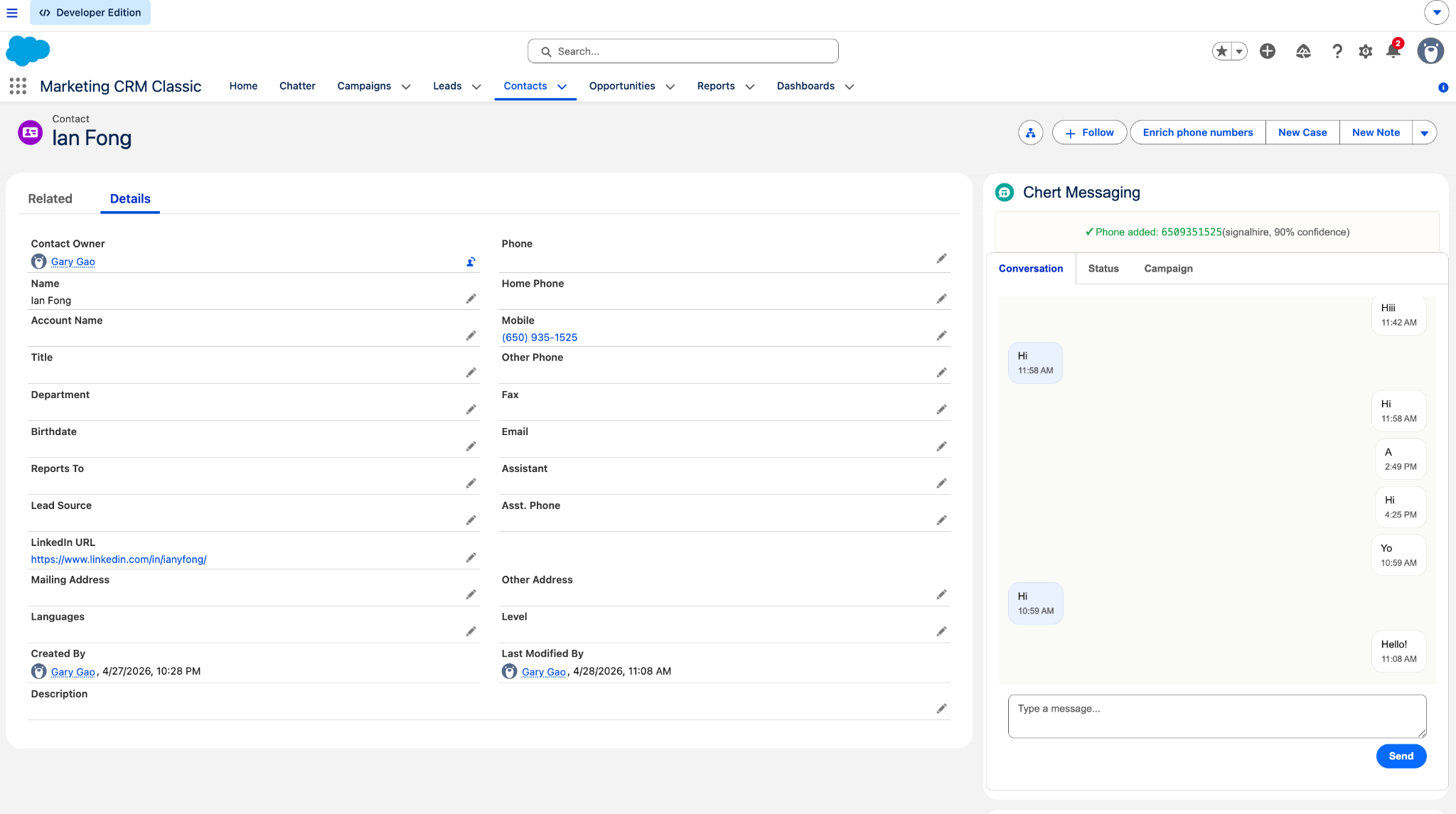
Chert for Salesforce is a Managed 2GP package that lets reps send
iMessage from Lead, Contact, and Account records. Replies are written
back to Salesforce as `Chert_Message__c` rows and mirrored onto the
Activity Timeline as standard Tasks.
 ## When to use it
Use the Salesforce package when your sales team works primarily from
Salesforce and needs iMessage activity recorded on the CRM record.
| | |
| ------------------ | -------------------------------------------------------------------------------------- |
| **Best fit** | Reps send from Salesforce records and managers want messages on the Activity Timeline. |
| **Automation fit** | Existing Flows, triggers, or buttons should hand off outbound iMessage sends. |
| **Not for** | Salesforce Classic, Essentials Edition, or orgs without API access. |
## What gets installed
\| Item | Where it shows up | What it does |
\|---|---|
\| Managed 2GP package | Installed Packages, namespace `Chert` | Current version `0.1.0-2`; coordinate version changes with Chert. |
\| `chertConversation` LWC | Lead, Contact, Account record pages | Conversation pane for sends, replies, status, and campaign context. |
\| `ChertSendIMessage` | Flow action / Apex invocable | Sends an outbound iMessage and returns the Chert message ID. |
\| `ChertInboundRest` | Apex REST endpoint | Receives inbound replies from Chert. |
\| `Chert_Message__c` | Custom object | Append-only inbound and outbound message log. |
\| `Chert_Endpoint` + `Chert_Tenant__mdt` | Setup | Stores the Chert API endpoint, tenant slug, signing secret, and inbound token. |
\| `Chert_Messaging_User` | Permission Set | Grants end users package object, field, Apex, and Named Credential access. |
## Requirements
| Requirement | Detail |
| -------------------- | ------------------------------------------------------------------------------------------------------------------------------------ |
| Salesforce edition | Enterprise, Unlimited, Performance, Developer, or Professional with API add-on. |
| Lightning Experience | Required. Salesforce Classic is not supported. |
| My Domain | Must be deployed to users. |
| Optional features | Person Accounts, Multi-Currency, and Shield Platform Encryption are compatible. See [Limits and Considerations](/salesforce/limits). |
## Minimal Flow example
Add an **Action** element in Flow Builder, search for **Chert Send
iMessage**, and bind:
| Input | Example value |
| ---------------- | ------------------------------------------------------------------------ |
| `phone` | `{!Lead.MobilePhone}` in E.164 format, for example `+14155551234`. |
| `message` | A text template such as `Hi {!Lead.FirstName}, this is Alex from Chert.` |
| `recordId` | `{!Lead.Id}` |
| `idempotencyKey` | A deterministic key for the send, for example `welcome-{!Lead.Id}`. |
Treat `duplicate = true` as success. The send was already accepted
within the deduplication window.
## Next steps
Seven-step setup from package install to first verified send.
Wire up the Named Credential, Custom Metadata, and Permission Sets.
Component map, sequence diagrams, and entity relationships.
Trust boundary, HMAC signature format, and data handling.
## When to use it
Use the Salesforce package when your sales team works primarily from
Salesforce and needs iMessage activity recorded on the CRM record.
| | |
| ------------------ | -------------------------------------------------------------------------------------- |
| **Best fit** | Reps send from Salesforce records and managers want messages on the Activity Timeline. |
| **Automation fit** | Existing Flows, triggers, or buttons should hand off outbound iMessage sends. |
| **Not for** | Salesforce Classic, Essentials Edition, or orgs without API access. |
## What gets installed
\| Item | Where it shows up | What it does |
\|---|---|
\| Managed 2GP package | Installed Packages, namespace `Chert` | Current version `0.1.0-2`; coordinate version changes with Chert. |
\| `chertConversation` LWC | Lead, Contact, Account record pages | Conversation pane for sends, replies, status, and campaign context. |
\| `ChertSendIMessage` | Flow action / Apex invocable | Sends an outbound iMessage and returns the Chert message ID. |
\| `ChertInboundRest` | Apex REST endpoint | Receives inbound replies from Chert. |
\| `Chert_Message__c` | Custom object | Append-only inbound and outbound message log. |
\| `Chert_Endpoint` + `Chert_Tenant__mdt` | Setup | Stores the Chert API endpoint, tenant slug, signing secret, and inbound token. |
\| `Chert_Messaging_User` | Permission Set | Grants end users package object, field, Apex, and Named Credential access. |
## Requirements
| Requirement | Detail |
| -------------------- | ------------------------------------------------------------------------------------------------------------------------------------ |
| Salesforce edition | Enterprise, Unlimited, Performance, Developer, or Professional with API add-on. |
| Lightning Experience | Required. Salesforce Classic is not supported. |
| My Domain | Must be deployed to users. |
| Optional features | Person Accounts, Multi-Currency, and Shield Platform Encryption are compatible. See [Limits and Considerations](/salesforce/limits). |
## Minimal Flow example
Add an **Action** element in Flow Builder, search for **Chert Send
iMessage**, and bind:
| Input | Example value |
| ---------------- | ------------------------------------------------------------------------ |
| `phone` | `{!Lead.MobilePhone}` in E.164 format, for example `+14155551234`. |
| `message` | A text template such as `Hi {!Lead.FirstName}, this is Alex from Chert.` |
| `recordId` | `{!Lead.Id}` |
| `idempotencyKey` | A deterministic key for the send, for example `welcome-{!Lead.Id}`. |
Treat `duplicate = true` as success. The send was already accepted
within the deduplication window.
## Next steps
Seven-step setup from package install to first verified send.
Wire up the Named Credential, Custom Metadata, and Permission Sets.
Component map, sequence diagrams, and entity relationships.
Trust boundary, HMAC signature format, and data handling.