> ## Documentation Index
> Fetch the complete documentation index at: https://docs.trychert.com/llms.txt
> Use this file to discover all available pages before exploring further.
# Configuration
> Wire up the Named Credential, Custom Metadata, Permission Sets, and Lightning Record Pages.
Every artifact the package depends on, what it does, and how to set it.
## Configuration Checklist
Complete in this order. Each step is detailed below.
1. Edit the **Chert\_Tenant.Default** Custom Metadata record.
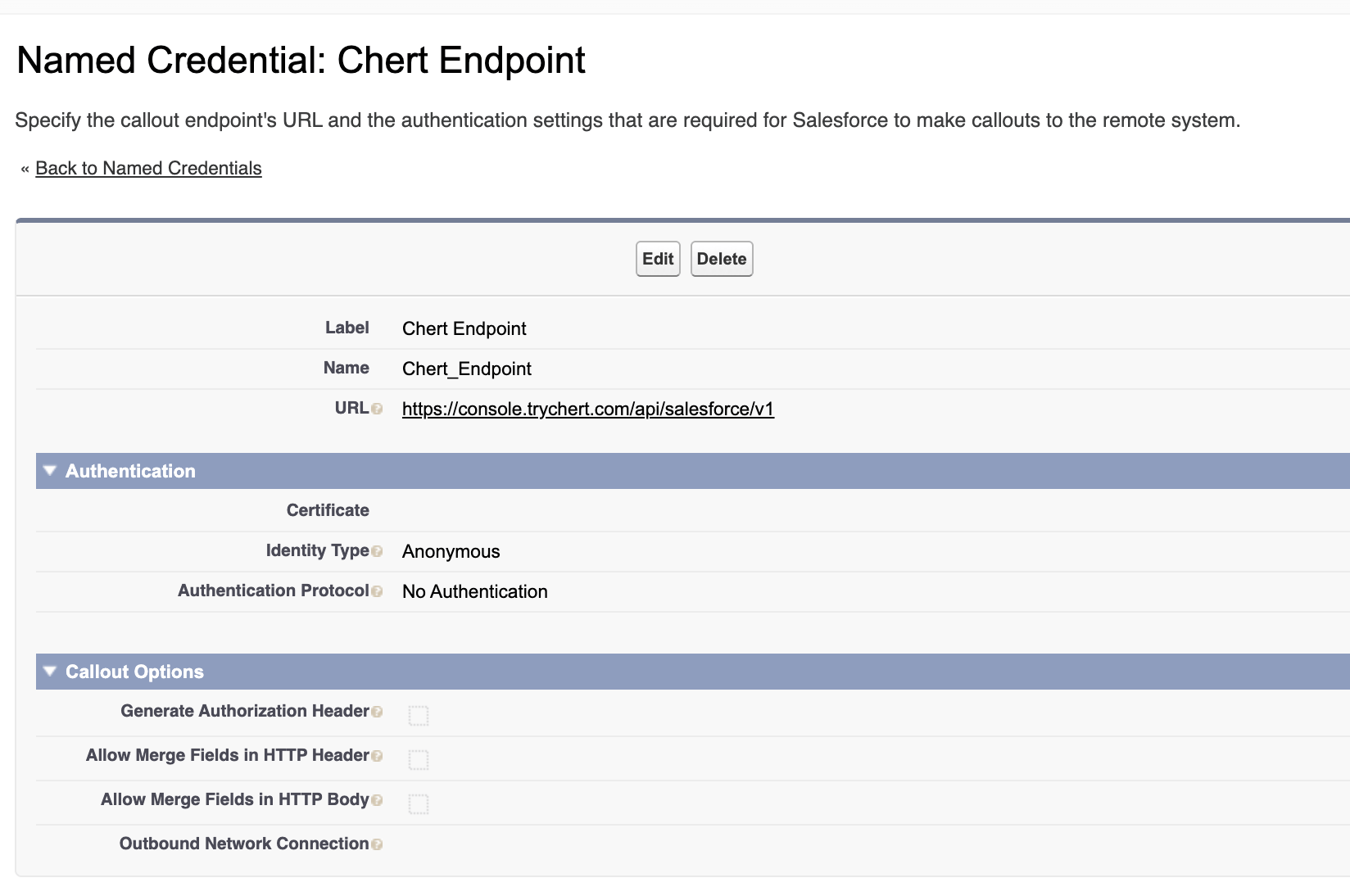
2. Verify the **Chert\_Endpoint** Named Credential.
3. Assign the **Chert Messaging User** Permission Set.
4. Activate the three Lightning Record Pages.
5. Wire `ChertSendIMessage` into a Flow or button.
## Custom Metadata — `Chert_Tenant__mdt`
The package ships one default record, `Chert_Tenant.Default`. It holds
the per-Org credentials for talking to the Chert API.
| Field | API name | Purpose | Source |
| -------------- | ------------------- | -------------------------------------------------------------------------------------------------- | --------------------------------------------------------- |
| Tenant Slug | `Tenant_Slug__c` | Identifies your Org to Chert. Sent on every request. | Provided by Chert at provisioning. |
| Signing Secret | `Signing_Secret__c` | HMAC-SHA256 key for signing outbound payloads. Never leaves the Org except as a derived signature. | Provided by Chert at provisioning. |
| Ingest Token | `Ingest_Token__c` | Bearer token Chert uses on inbound reply callbacks. | Generated by you, supplied to Chert. |
| Chert Base URL | `Chert_Base_URL__c` | Override only when Chert directs you to a non-default region. | Default: `https://console.trychert.com/api/salesforce/v1` |
**To configure:** From Setup, enter **Custom Metadata Types**, click
**Manage Records** beside **Chert Tenant**, edit **Default**, and paste
the values. Click **Save**.
The record's **Protected Component** flag should be **true** before any
managed package promotion. Protected metadata cannot be read by Apex in
subscriber Orgs that did not install the package, and cannot be exported
through the Metadata API by non-System Administrators.
## Named Credential — `Chert_Endpoint`
| Property | Value |
| ----------------------------- | ------------------------------------------------ |
| Label | Chert Endpoint |
| Name | `Chert_Endpoint` |
| URL | `https://console.trychert.com/api/salesforce/v1` |
| Identity Type | Anonymous |
| Authentication Protocol | No Authentication |
| Generate Authorization Header | Disabled |
 Authentication is handled in Apex by signing the request body with the
`Signing_Secret__c` from Custom Metadata. The Named Credential exists to
keep the endpoint URL out of code and to satisfy the platform requirement
that Apex callouts use a registered endpoint.
If your Org connects to a regional Chert deployment, update the Named
Credential URL — do not edit Apex.
## Permission Set — `Chert Messaging User`
Assigned to every user who will send iMessages or view conversations.
Salesforce best practice is Permission Set assignment, not Profile
modification; the package contains no Profiles.
| Grant | Scope |
| ----------------------------------- | ----------------------------------------------------------------------------------------------------------------------------------------------------------------------------- |
| **Object — `Chert_Message__c`** | Read, Create — no Edit, no Delete, no View All, no Modify All. Records are append-only by design. |
| **Object — Lead, Contact, Account** | Read, Edit — required for the Lightning component to update phone fields after enrichment. |
| **Field-level security** | Read on every standard field referenced by the conversation pane; Edit on `MobilePhone` and the Chert-prefixed enrichment fields. |
| **Apex class access** | `ChertSendIMessage`, `ChertBridge`, `ChertContactsRest`, `ChertEnrichService`, `ChertEnrichResultRest`, `ChertEnrichmentRunNowRest`, `ChertInboundRest`, `ChertTenantConfig`. |
| **Named Credential access** | `Chert_Endpoint`. |
| **User permissions** | None beyond the platform default. The package does not grant **View All Data**, **Modify All Data**, or any custom user permission. |
**To assign:** From Setup, enter **Permission Sets**, click
**Chert Messaging User**, click **Manage Assignments**, click **Add
Assignments**, select users, click **Assign**.
For larger rollouts, group **Chert Messaging User** into a Permission
Set Group alongside any role-specific Permission Sets.
## Lightning Record Pages
The package ships three Flexipages, each with the
`chertConversation` component pre-placed.
| Page | Object | Activation |
| --------------------------- | ------- | ---------------------------------------------------- |
| `Lead_Record_Page_Chert` | Lead | Org default, App default, or per record-type/profile |
| `Contact_Record_Page_Chert` | Contact | Org default, App default, or per record-type/profile |
| `Account_Record_Page_Chert` | Account | Org default, App default, or per record-type/profile |
**To activate:** From Setup, enter **Lightning App Builder**. For each
page, click **Activation**, choose the activation scope, and click
**Save**. Activation is per-Org — a sandbox-active page does not
auto-activate in production.
## Quick Actions
| Quick Action | Object | LWC | Purpose |
| ---------------------- | ------- | ----------------------- | ----------------------------------------------------------- |
| `Start_Chert_Sequence` | Contact | `chertSequenceLauncher` | Enroll one or more Contacts into a Chert outbound sequence. |
| `Enrich_Phone_Numbers` | Contact | `chertBulkEnrich` | Bulk-enrich missing mobile numbers via Chert. |
Add either Quick Action to a Lightning Record Page or List View by
editing the relevant Page Layout or List View Button Layout.
## Wiring `ChertSendIMessage` into a Flow
The invocable action accepts these inputs:
| Input | Type | Required | Purpose |
| ---------------- | ---- | ----------- | --------------------------------------------------------------------------------------------------------- |
| `phone` | Text | Yes | E.164 phone number (`+14155551234`). |
| `message` | Text | Yes | Body of the iMessage. |
| `recordId` | Text | Recommended | The Salesforce ID the send relates to. Surfaces in Chert reporting and on the related `Chert_Message__c`. |
| `idempotencyKey` | Text | Recommended | Deterministic key. Re-invoking with the same key within the dedup window is a no-op. |
Outputs:
| Output | Type | Purpose |
| ----------- | ------- | ------------------------------------------------------------------------- |
| `messageId` | Text | The Chert-side message ID. Persist on the parent record for traceability. |
| `duplicate` | Boolean | `true` if the send was deduplicated. Treat as success. |
To use from Flow Builder, drop an **Action** element, search for
**Chert Send iMessage**, and bind the Lead's `MobilePhone` and a text
template to `phone` and `message`. Use the Lead Id as `recordId`.
## See Also
* [INSTALL](INSTALL.md) for the prerequisite step.
* [SECURITY](SECURITY.md) for the trust boundary and HMAC format.
* [ARCHITECTURE](ARCHITECTURE.md) for what runs synchronously versus asynchronously.
Authentication is handled in Apex by signing the request body with the
`Signing_Secret__c` from Custom Metadata. The Named Credential exists to
keep the endpoint URL out of code and to satisfy the platform requirement
that Apex callouts use a registered endpoint.
If your Org connects to a regional Chert deployment, update the Named
Credential URL — do not edit Apex.
## Permission Set — `Chert Messaging User`
Assigned to every user who will send iMessages or view conversations.
Salesforce best practice is Permission Set assignment, not Profile
modification; the package contains no Profiles.
| Grant | Scope |
| ----------------------------------- | ----------------------------------------------------------------------------------------------------------------------------------------------------------------------------- |
| **Object — `Chert_Message__c`** | Read, Create — no Edit, no Delete, no View All, no Modify All. Records are append-only by design. |
| **Object — Lead, Contact, Account** | Read, Edit — required for the Lightning component to update phone fields after enrichment. |
| **Field-level security** | Read on every standard field referenced by the conversation pane; Edit on `MobilePhone` and the Chert-prefixed enrichment fields. |
| **Apex class access** | `ChertSendIMessage`, `ChertBridge`, `ChertContactsRest`, `ChertEnrichService`, `ChertEnrichResultRest`, `ChertEnrichmentRunNowRest`, `ChertInboundRest`, `ChertTenantConfig`. |
| **Named Credential access** | `Chert_Endpoint`. |
| **User permissions** | None beyond the platform default. The package does not grant **View All Data**, **Modify All Data**, or any custom user permission. |
**To assign:** From Setup, enter **Permission Sets**, click
**Chert Messaging User**, click **Manage Assignments**, click **Add
Assignments**, select users, click **Assign**.
For larger rollouts, group **Chert Messaging User** into a Permission
Set Group alongside any role-specific Permission Sets.
## Lightning Record Pages
The package ships three Flexipages, each with the
`chertConversation` component pre-placed.
| Page | Object | Activation |
| --------------------------- | ------- | ---------------------------------------------------- |
| `Lead_Record_Page_Chert` | Lead | Org default, App default, or per record-type/profile |
| `Contact_Record_Page_Chert` | Contact | Org default, App default, or per record-type/profile |
| `Account_Record_Page_Chert` | Account | Org default, App default, or per record-type/profile |
**To activate:** From Setup, enter **Lightning App Builder**. For each
page, click **Activation**, choose the activation scope, and click
**Save**. Activation is per-Org — a sandbox-active page does not
auto-activate in production.
## Quick Actions
| Quick Action | Object | LWC | Purpose |
| ---------------------- | ------- | ----------------------- | ----------------------------------------------------------- |
| `Start_Chert_Sequence` | Contact | `chertSequenceLauncher` | Enroll one or more Contacts into a Chert outbound sequence. |
| `Enrich_Phone_Numbers` | Contact | `chertBulkEnrich` | Bulk-enrich missing mobile numbers via Chert. |
Add either Quick Action to a Lightning Record Page or List View by
editing the relevant Page Layout or List View Button Layout.
## Wiring `ChertSendIMessage` into a Flow
The invocable action accepts these inputs:
| Input | Type | Required | Purpose |
| ---------------- | ---- | ----------- | --------------------------------------------------------------------------------------------------------- |
| `phone` | Text | Yes | E.164 phone number (`+14155551234`). |
| `message` | Text | Yes | Body of the iMessage. |
| `recordId` | Text | Recommended | The Salesforce ID the send relates to. Surfaces in Chert reporting and on the related `Chert_Message__c`. |
| `idempotencyKey` | Text | Recommended | Deterministic key. Re-invoking with the same key within the dedup window is a no-op. |
Outputs:
| Output | Type | Purpose |
| ----------- | ------- | ------------------------------------------------------------------------- |
| `messageId` | Text | The Chert-side message ID. Persist on the parent record for traceability. |
| `duplicate` | Boolean | `true` if the send was deduplicated. Treat as success. |
To use from Flow Builder, drop an **Action** element, search for
**Chert Send iMessage**, and bind the Lead's `MobilePhone` and a text
template to `phone` and `message`. Use the Lead Id as `recordId`.
## See Also
* [INSTALL](INSTALL.md) for the prerequisite step.
* [SECURITY](SECURITY.md) for the trust boundary and HMAC format.
* [ARCHITECTURE](ARCHITECTURE.md) for what runs synchronously versus asynchronously.