> ## Documentation Index
> Fetch the complete documentation index at: https://docs.trychert.com/llms.txt
> Use this file to discover all available pages before exploring further.
# Architecture
> Component map, sequence diagrams, and entity relationships.
Component map, call graph, and synchronous-versus-asynchronous behavior.
## System Landscape
 A Salesforce Org issues outbound HTTPS to the Chert messaging service
through the `Chert_Endpoint` Named Credential. Chert dispatches sends
to its delivery infrastructure and posts replies back into the Org via
the `ChertInboundRest` REST resource.
There are no hardcoded endpoints in Apex. Every outbound HTTP call
flows through `Chert_Endpoint`.
## Components
### Apex
| Class | Responsibility | Sharing |
| --------------------------- | ------------------------------------------------------------------------------------------------------------------------------------------------------- | ----------------- |
| `ChertSendIMessage` | Invocable action. Signs the request, calls Chert, returns `messageId` and `duplicate` to the Flow. | `with sharing` |
| `ChertBridge` | `@AuraEnabled` data layer for the Lightning Web Components. Resolves Contact / Lead / Account context, exposes campaign status, drives bulk enrichment. | `with sharing` |
| `ChertEnrichService` | Background phone-number enrichment. Signs and POSTs to Chert; persists results when the callback returns. | `with sharing` |
| `ChertEnrichScheduler` | `Schedulable` + `Batchable`. Nightly run that enqueues missing-mobile Contacts for enrichment. | `with sharing` |
| `ChertEnrichmentRunNowRest` | REST resource for on-demand enrichment triggered from the LWC. | `with sharing` |
| `ChertEnrichResultRest` | REST resource for asynchronous enrichment callbacks from Chert. Bearer-authenticated. | `with sharing` |
| `ChertInboundRest` | REST resource for reply ingestion. Bearer-authenticated. Resolves the parent record by `(salesforce_record_id, phone)` tie-break. | `with sharing` |
| `ChertContactsRest` | Site-exposed REST resource for the operator dashboard's live-Contacts feed. Bearer-authenticated. Read-only plus a single mutable field. | `without sharing` |
| `ChertTenantConfig` | Static accessor for `Chert_Tenant.Default` Custom Metadata. | `with sharing` |
### Lightning Web Components
| Component | Surface | Purpose |
| ----------------------- | ----------------------------------------- | ---------------------------------------------------------------------------------------------------------------------------------------------------------------------------------------------------------------------------------------------------------------------------------------------------------------------------------------------------------------------------- |
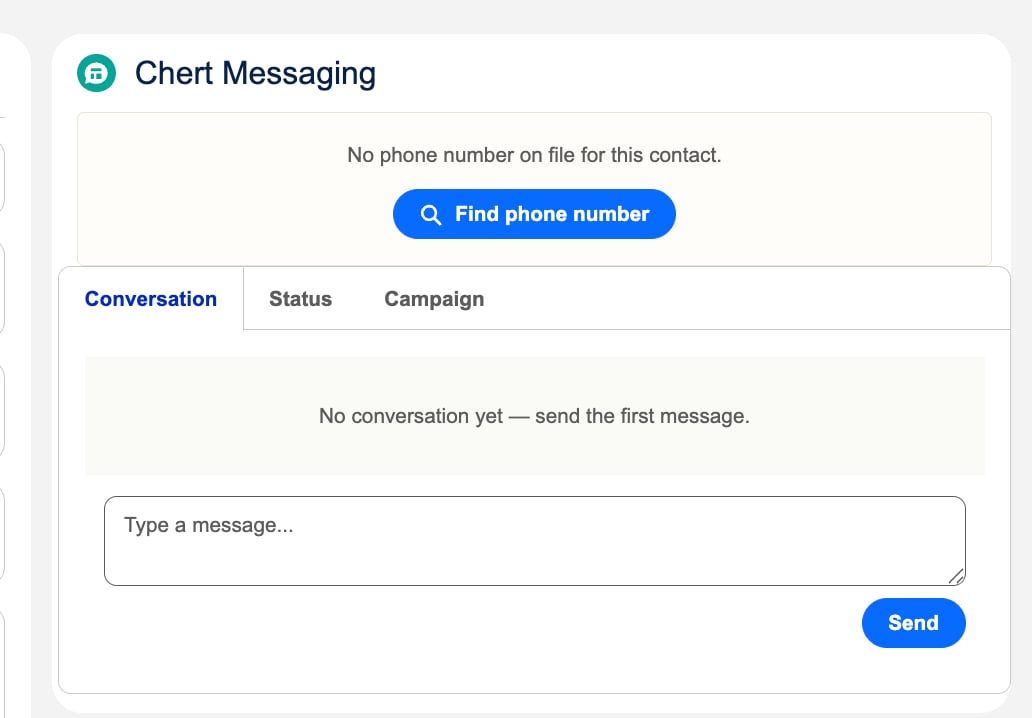
| `chertConversation` | Lead, Contact, Account record pages | Three-tab pane: **Conversation** (full iMessage thread + inline send box, auto-refreshing), **Status** (CRM status, phone line in use, next scheduled send, sequence enrollment), **Campaign** (today's send count, send window, recent activity). When the record has no phone number, the component shows a **Find phone number** action instead of the conversation view. |
| `chertSequenceLauncher` | Contact Quick Action and List View action | Enrolls one or more Contacts into a Chert outbound sequence. |
| `chertBulkEnrich` | Contact List View action | Bulk-enriches missing mobile numbers. Concurrency-bounded. |
### Custom Objects and Metadata
| Object | Type | Purpose |
| ------------------- | -------------------- | ---------------------------------------------------------------------------------- |
| `Chert_Message__c` | Custom object | Append-only conversation log. One record per message, in or out. |
| `Chert_Tenant__mdt` | Custom Metadata Type | Per-Org credentials: tenant slug, signing secret, ingest token, base URL override. |
### Platform Wiring
| Artifact | Purpose |
| --------------------------------------------------------------------------------------------- | ------------------------------------------------------- |
| `Chert_Endpoint` Named Credential | Single outbound endpoint registration. |
| `Chert_Messaging_User` Permission Set | End-user access grants. |
| `Lead_Record_Page_Chert`, `Contact_Record_Page_Chert`, `Account_Record_Page_Chert` Flexipages | Lightning Record Pages with `chertConversation` placed. |
| `Start_Chert_Sequence`, `Enrich_Phone_Numbers` Quick Actions | LWC entry points on Contact. |
## Outbound Send Sequence
A Salesforce Org issues outbound HTTPS to the Chert messaging service
through the `Chert_Endpoint` Named Credential. Chert dispatches sends
to its delivery infrastructure and posts replies back into the Org via
the `ChertInboundRest` REST resource.
There are no hardcoded endpoints in Apex. Every outbound HTTP call
flows through `Chert_Endpoint`.
## Components
### Apex
| Class | Responsibility | Sharing |
| --------------------------- | ------------------------------------------------------------------------------------------------------------------------------------------------------- | ----------------- |
| `ChertSendIMessage` | Invocable action. Signs the request, calls Chert, returns `messageId` and `duplicate` to the Flow. | `with sharing` |
| `ChertBridge` | `@AuraEnabled` data layer for the Lightning Web Components. Resolves Contact / Lead / Account context, exposes campaign status, drives bulk enrichment. | `with sharing` |
| `ChertEnrichService` | Background phone-number enrichment. Signs and POSTs to Chert; persists results when the callback returns. | `with sharing` |
| `ChertEnrichScheduler` | `Schedulable` + `Batchable`. Nightly run that enqueues missing-mobile Contacts for enrichment. | `with sharing` |
| `ChertEnrichmentRunNowRest` | REST resource for on-demand enrichment triggered from the LWC. | `with sharing` |
| `ChertEnrichResultRest` | REST resource for asynchronous enrichment callbacks from Chert. Bearer-authenticated. | `with sharing` |
| `ChertInboundRest` | REST resource for reply ingestion. Bearer-authenticated. Resolves the parent record by `(salesforce_record_id, phone)` tie-break. | `with sharing` |
| `ChertContactsRest` | Site-exposed REST resource for the operator dashboard's live-Contacts feed. Bearer-authenticated. Read-only plus a single mutable field. | `without sharing` |
| `ChertTenantConfig` | Static accessor for `Chert_Tenant.Default` Custom Metadata. | `with sharing` |
### Lightning Web Components
| Component | Surface | Purpose |
| ----------------------- | ----------------------------------------- | ---------------------------------------------------------------------------------------------------------------------------------------------------------------------------------------------------------------------------------------------------------------------------------------------------------------------------------------------------------------------------- |
| `chertConversation` | Lead, Contact, Account record pages | Three-tab pane: **Conversation** (full iMessage thread + inline send box, auto-refreshing), **Status** (CRM status, phone line in use, next scheduled send, sequence enrollment), **Campaign** (today's send count, send window, recent activity). When the record has no phone number, the component shows a **Find phone number** action instead of the conversation view. |
| `chertSequenceLauncher` | Contact Quick Action and List View action | Enrolls one or more Contacts into a Chert outbound sequence. |
| `chertBulkEnrich` | Contact List View action | Bulk-enriches missing mobile numbers. Concurrency-bounded. |
### Custom Objects and Metadata
| Object | Type | Purpose |
| ------------------- | -------------------- | ---------------------------------------------------------------------------------- |
| `Chert_Message__c` | Custom object | Append-only conversation log. One record per message, in or out. |
| `Chert_Tenant__mdt` | Custom Metadata Type | Per-Org credentials: tenant slug, signing secret, ingest token, base URL override. |
### Platform Wiring
| Artifact | Purpose |
| --------------------------------------------------------------------------------------------- | ------------------------------------------------------- |
| `Chert_Endpoint` Named Credential | Single outbound endpoint registration. |
| `Chert_Messaging_User` Permission Set | End-user access grants. |
| `Lead_Record_Page_Chert`, `Contact_Record_Page_Chert`, `Account_Record_Page_Chert` Flexipages | Lightning Record Pages with `chertConversation` placed. |
| `Start_Chert_Sequence`, `Enrich_Phone_Numbers` Quick Actions | LWC entry points on Contact. |
## Outbound Send Sequence
 1. A Flow, trigger, button, or LWC invokes `ChertSendIMessage`.
2. The action loads `Chert_Tenant.Default` through `ChertTenantConfig`.
3. The action serializes the JSON body, computes `HMAC-SHA256(., secret)`, and attaches the `x-chert-signature` header.
4. The action issues a `POST` through `Chert_Endpoint` to `/send`.
5. Chert verifies signature and timestamp, resolves or creates the lead, and dispatches the send through its delivery infrastructure.
6. Chert returns `{ ok, lead_id, message_id, duplicate }`.
7. The action inserts a `Chert_Message__c` row with `direction = 'outbound'` and the returned `message_id`.
8. The action returns `{ messageId, duplicate }` to the Flow.
End-to-end latency in the Apex transaction is dominated by the HTTPS
round trip; typical observed latency is 400–900 ms.
## Inbound Reply Sequence
1. A Flow, trigger, button, or LWC invokes `ChertSendIMessage`.
2. The action loads `Chert_Tenant.Default` through `ChertTenantConfig`.
3. The action serializes the JSON body, computes `HMAC-SHA256(., secret)`, and attaches the `x-chert-signature` header.
4. The action issues a `POST` through `Chert_Endpoint` to `/send`.
5. Chert verifies signature and timestamp, resolves or creates the lead, and dispatches the send through its delivery infrastructure.
6. Chert returns `{ ok, lead_id, message_id, duplicate }`.
7. The action inserts a `Chert_Message__c` row with `direction = 'outbound'` and the returned `message_id`.
8. The action returns `{ messageId, duplicate }` to the Flow.
End-to-end latency in the Apex transaction is dominated by the HTTPS
round trip; typical observed latency is 400–900 ms.
## Inbound Reply Sequence
 1. A recipient replies. Chert receives the inbound message from its delivery infrastructure.
2. Chert POSTs to `.my.salesforce.com/services/apexrest/chert/v1/inbound` with the bearer ingest token in the `Authorization` header.
3. `ChertInboundRest` validates the bearer against `Chert_Tenant__mdt.Ingest_Token__c`.
4. The resource resolves the parent record by the `salesforce_record_id` from the original send, falling back to a phone-number match if the original record is unavailable.
5. The resource inserts a `Chert_Message__c` with `direction = 'inbound'` and inserts a standard `Task` against the same parent record so the reply surfaces on the Salesforce Activity Timeline alongside emails and calls.
6. Open `chertConversation` components subscribed to the Contact's record updates pick up the new row on the next refresh.
Every outbound send writes the same pair: a `Chert_Message__c` row with
`direction = 'outbound'` and a corresponding `Task`. Standard
Salesforce reports built on Tasks pick up iMessage activity without
custom report types.
## Phone Enrichment
Enrichment fills `Contact.MobilePhone` (and the Chert-prefixed metadata
fields) for records that arrive without a number. There are three
trigger points and one resolver pipeline.
### Trigger points
1. A recipient replies. Chert receives the inbound message from its delivery infrastructure.
2. Chert POSTs to `.my.salesforce.com/services/apexrest/chert/v1/inbound` with the bearer ingest token in the `Authorization` header.
3. `ChertInboundRest` validates the bearer against `Chert_Tenant__mdt.Ingest_Token__c`.
4. The resource resolves the parent record by the `salesforce_record_id` from the original send, falling back to a phone-number match if the original record is unavailable.
5. The resource inserts a `Chert_Message__c` with `direction = 'inbound'` and inserts a standard `Task` against the same parent record so the reply surfaces on the Salesforce Activity Timeline alongside emails and calls.
6. Open `chertConversation` components subscribed to the Contact's record updates pick up the new row on the next refresh.
Every outbound send writes the same pair: a `Chert_Message__c` row with
`direction = 'outbound'` and a corresponding `Task`. Standard
Salesforce reports built on Tasks pick up iMessage activity without
custom report types.
## Phone Enrichment
Enrichment fills `Contact.MobilePhone` (and the Chert-prefixed metadata
fields) for records that arrive without a number. There are three
trigger points and one resolver pipeline.
### Trigger points
 | Trigger | Surface | Path |
| ----------------------------- | ----------------------------------------------------------------------------------------- | ------------------------------------------------------ |
| Single contact, in Salesforce | The `chertConversation` component's **Find phone number** action when no phone is on file | `ChertBridge.enrichContact` → `ChertEnrichService` |
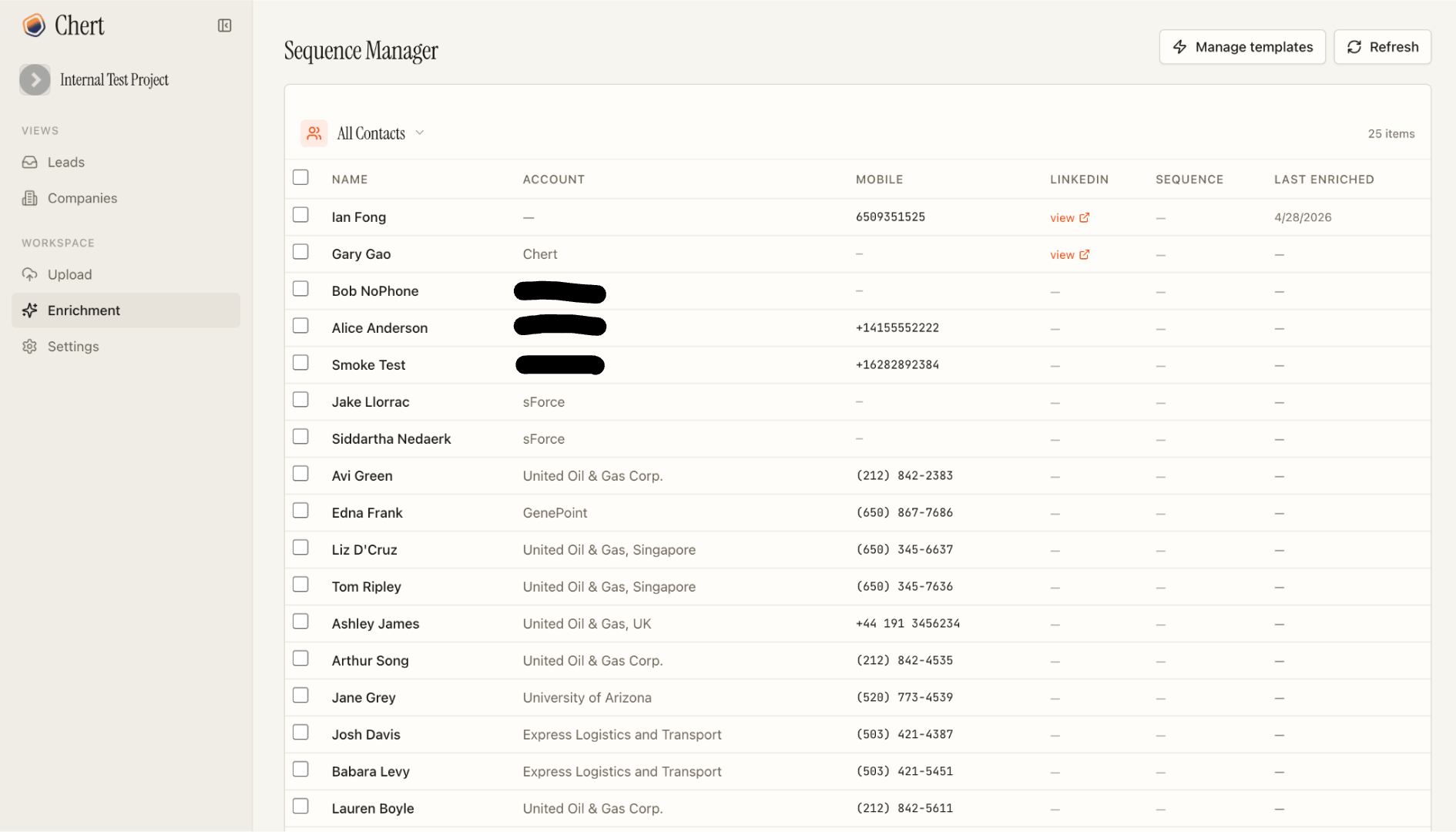
| Bulk, list view | The `Enrich Phone Numbers` Quick Action on Contact list views (`chertBulkEnrich`) | `ChertBridge.bulkEnrich` → `ChertEnrichmentRunNowRest` |
| Bulk, console | The Chert console's enrichment dashboard | Calls `ChertEnrichmentRunNowRest` directly |
| Trigger | Surface | Path |
| ----------------------------- | ----------------------------------------------------------------------------------------- | ------------------------------------------------------ |
| Single contact, in Salesforce | The `chertConversation` component's **Find phone number** action when no phone is on file | `ChertBridge.enrichContact` → `ChertEnrichService` |
| Bulk, list view | The `Enrich Phone Numbers` Quick Action on Contact list views (`chertBulkEnrich`) | `ChertBridge.bulkEnrich` → `ChertEnrichmentRunNowRest` |
| Bulk, console | The Chert console's enrichment dashboard | Calls `ChertEnrichmentRunNowRest` directly |
 ### Resolver waterfall
The Chert side runs a three-step waterfall:
Recent enrichment results for the same identity (LinkedIn URL, email, or `(name, company)` tuple) are returned from cache without re-querying providers.
Multiple phone-data providers are queried in parallel. Results are crosschecked against each other; a number that appears across two or more sources gets a high confidence score, a single-source result gets a lower one.
Chert POSTs the result to `ChertEnrichResultRest` (bearer-authenticated). The resource updates `Contact.MobilePhone` and stamps `Chert_Phone_Source__c`, `Chert_Phone_Confidence__c`, and `Chert_Last_Enriched_At__c`. If no provider returns a match, the row is stamped with `Chert_Enrichment_Status__c = 'no_match'` so the dashboard knows not to retry.
The first trigger (single contact) is **synchronous** from the operator's
perspective — they click and wait. Bulk paths kick off `Queueable` jobs
on the Chert side and return immediately; the `chertBulkEnrich`
component polls for completion via `ChertEnrichResultRest` callbacks.
### Stamped metadata
| Field | Type | Meaning |
| ---------------------------- | -------- | --------------------------------------------------------------- |
| `Chert_Phone_Source__c` | Picklist | Which provider returned the number, or `manual` if hand-entered |
| `Chert_Phone_Confidence__c` | Number | 0–100 score, higher when multiple sources agree |
| `Chert_Last_Enriched_At__c` | DateTime | When enrichment last ran for this Contact |
| `Chert_Enrichment_Status__c` | Picklist | `pending`, `enriched`, `no_match`, or `failed` |
The Permission Set grants Read on all four fields and Edit on
`MobilePhone` so the bulk-enrich component can write back through
standard DML.
## Sequencing
The `chertSequenceLauncher` Quick Action enrolls Contacts into a Chert
sequence. Sequences are configured in the Chert console; the package
exposes only the enrollment surface.
A sequence contains:
* An ordered set of steps (initial message, follow-ups)
* A delay between each step
* Message copy per step, with template variables for `{name}`, `{company}`, `{calendar}`, and any `{custom_field}` you bind from a CSV column or Salesforce field
* A send window and timezone
* A per-line spacing rule between consecutive sends
* A phone-line pool that scopes which lines this sequence may use
When a lead replies at any step, the sequence stops automatically — no
further automated messages go out for that lead. The reply is logged to
`Chert_Message__c` and the Activity Timeline; from there a rep handles
the conversation manually.
## Entity Relationship
### Resolver waterfall
The Chert side runs a three-step waterfall:
Recent enrichment results for the same identity (LinkedIn URL, email, or `(name, company)` tuple) are returned from cache without re-querying providers.
Multiple phone-data providers are queried in parallel. Results are crosschecked against each other; a number that appears across two or more sources gets a high confidence score, a single-source result gets a lower one.
Chert POSTs the result to `ChertEnrichResultRest` (bearer-authenticated). The resource updates `Contact.MobilePhone` and stamps `Chert_Phone_Source__c`, `Chert_Phone_Confidence__c`, and `Chert_Last_Enriched_At__c`. If no provider returns a match, the row is stamped with `Chert_Enrichment_Status__c = 'no_match'` so the dashboard knows not to retry.
The first trigger (single contact) is **synchronous** from the operator's
perspective — they click and wait. Bulk paths kick off `Queueable` jobs
on the Chert side and return immediately; the `chertBulkEnrich`
component polls for completion via `ChertEnrichResultRest` callbacks.
### Stamped metadata
| Field | Type | Meaning |
| ---------------------------- | -------- | --------------------------------------------------------------- |
| `Chert_Phone_Source__c` | Picklist | Which provider returned the number, or `manual` if hand-entered |
| `Chert_Phone_Confidence__c` | Number | 0–100 score, higher when multiple sources agree |
| `Chert_Last_Enriched_At__c` | DateTime | When enrichment last ran for this Contact |
| `Chert_Enrichment_Status__c` | Picklist | `pending`, `enriched`, `no_match`, or `failed` |
The Permission Set grants Read on all four fields and Edit on
`MobilePhone` so the bulk-enrich component can write back through
standard DML.
## Sequencing
The `chertSequenceLauncher` Quick Action enrolls Contacts into a Chert
sequence. Sequences are configured in the Chert console; the package
exposes only the enrollment surface.
A sequence contains:
* An ordered set of steps (initial message, follow-ups)
* A delay between each step
* Message copy per step, with template variables for `{name}`, `{company}`, `{calendar}`, and any `{custom_field}` you bind from a CSV column or Salesforce field
* A send window and timezone
* A per-line spacing rule between consecutive sends
* A phone-line pool that scopes which lines this sequence may use
When a lead replies at any step, the sequence stops automatically — no
further automated messages go out for that lead. The reply is logged to
`Chert_Message__c` and the Activity Timeline; from there a rep handles
the conversation manually.
## Entity Relationship
 `Chert_Message__c` carries a `Lookup` to **Contact**, a `Lookup` to
**Lead**, and a `Chert_Message_Id__c` external ID for upserts during
ingestion. Both Contact and Lead lookups are nullable; exactly one is
populated per record.
`Chert_Tenant__mdt` is a single-record metadata type. The `Default`
record is the only supported instance.
## Synchronous versus Asynchronous Boundaries
| Action | Where it runs |
| ------------------------------------------------------------------- | ---------------------------------------------------------------------------------------------------------------------------------- |
| `ChertSendIMessage.send` | Synchronous. Returns to the caller within one Apex transaction. |
| `ChertBridge.getContext`, `getCampaignStatus`, `getAccountContacts` | Synchronous read paths invoked from the LWC. |
| `ChertBridge.startSequenceForRecords` | Synchronous orchestration; one Chert callout per record. Bounded to 80 records per call by the LWC; larger sets chunk client-side. |
| `ChertBridge.enrichContact` | Synchronous trigger of an asynchronous Chert-side enrichment. |
| `ChertEnrichScheduler.execute` | Asynchronous. Scheduled Apex daily; enqueues a batch. |
| Chert's enrichment callback to `ChertEnrichResultRest` | Asynchronous. Out-of-band write into the Org. |
| Chert's reply callback to `ChertInboundRest` | Asynchronous. Out-of-band write into the Org. |
## Idempotency and Dedup
Outbound sends carry a deterministic `idempotency_key`. Within Chert's
6-hour rolling window, a duplicate key returns
`{ duplicate: true, ok: true }` without re-delivering. The Flow should
treat `duplicate: true` as success.
Inbound replies are deduped on Chert's `message_id`, persisted as the
`Chert_Message_Id__c` external ID on `Chert_Message__c`. Re-delivery
of the same reply upserts in place.
## Error Handling
| Surface | On failure |
| ------------------------------------------- | ------------------------------------------------------------------------------------------------------------------------------------------------------------- |
| `ChertSendIMessage` | Returns `{ ok: false, errorCode, errorMessage }` to the Flow. The Flow author chooses the retry strategy. |
| `ChertBridge` `@AuraEnabled` methods | Throw `AuraHandledException` with a sanitized message. The LWC surfaces the error through `lightning/platformShowToastEvent`. |
| `ChertInboundRest`, `ChertEnrichResultRest` | Return HTTP `4xx` for malformed input or auth failure, `5xx` for unexpected server errors. Chert retries `5xx` with exponential backoff up to three attempts. |
### Chert-side API responses
The `/api/salesforce/*` endpoints on Chert's side (which the Apex classes
above call) keep the `{ ok: false, ... }` shape — the Apex client branches
on `ok` — but every error path now also carries the canonical numeric
`code`, a generic human `message`, a `retryable` boolean, and a `trace_id`
(also in the `X-Trace-ID` header). The numeric `code` follows the shared
[Messaging API error scheme](/api/errors); provider names, env var names,
and raw database errors are no longer leaked in `message` — the full
detail is logged server-side under `trace_id`. Auth and signature failures
return distinct codes (`2012` missing credentials, `2004` invalid
signature/token, `2013` timestamp skew) rather than one opaque
"unauthorized".
The widget context endpoint (`/api/salesforce/v1/widget/context`) was made
consistent: a record with no lead yet **always** returns
`200 { ok: true, lead: null }` — it no longer sometimes returns `404`.
## Extension Points
| Hook | Use |
| ------------------------------------ | ----------------------------------------------------------------------------------------------------- |
| `ChertSendIMessage` invocable | Compose into any Flow, Process Builder, or trigger. |
| `ChertBridge` `@AuraEnabled` methods | Build additional LWC surfaces against the same data layer. |
| `Chert_Message__c` triggers | Add Org-side automation on inbound reply ingestion (assign owner, create Task, raise Platform Event). |
## See Also
* [SECURITY](SECURITY.md) for the trust boundary and HMAC format.
* [LIMITS AND CONSIDERATIONS](LIMITS_AND_CONSIDERATIONS.md) for the governor-limit budget per send.
* [CONFIGURATION](CONFIGURATION.md) for the per-component setup detail.
`Chert_Message__c` carries a `Lookup` to **Contact**, a `Lookup` to
**Lead**, and a `Chert_Message_Id__c` external ID for upserts during
ingestion. Both Contact and Lead lookups are nullable; exactly one is
populated per record.
`Chert_Tenant__mdt` is a single-record metadata type. The `Default`
record is the only supported instance.
## Synchronous versus Asynchronous Boundaries
| Action | Where it runs |
| ------------------------------------------------------------------- | ---------------------------------------------------------------------------------------------------------------------------------- |
| `ChertSendIMessage.send` | Synchronous. Returns to the caller within one Apex transaction. |
| `ChertBridge.getContext`, `getCampaignStatus`, `getAccountContacts` | Synchronous read paths invoked from the LWC. |
| `ChertBridge.startSequenceForRecords` | Synchronous orchestration; one Chert callout per record. Bounded to 80 records per call by the LWC; larger sets chunk client-side. |
| `ChertBridge.enrichContact` | Synchronous trigger of an asynchronous Chert-side enrichment. |
| `ChertEnrichScheduler.execute` | Asynchronous. Scheduled Apex daily; enqueues a batch. |
| Chert's enrichment callback to `ChertEnrichResultRest` | Asynchronous. Out-of-band write into the Org. |
| Chert's reply callback to `ChertInboundRest` | Asynchronous. Out-of-band write into the Org. |
## Idempotency and Dedup
Outbound sends carry a deterministic `idempotency_key`. Within Chert's
6-hour rolling window, a duplicate key returns
`{ duplicate: true, ok: true }` without re-delivering. The Flow should
treat `duplicate: true` as success.
Inbound replies are deduped on Chert's `message_id`, persisted as the
`Chert_Message_Id__c` external ID on `Chert_Message__c`. Re-delivery
of the same reply upserts in place.
## Error Handling
| Surface | On failure |
| ------------------------------------------- | ------------------------------------------------------------------------------------------------------------------------------------------------------------- |
| `ChertSendIMessage` | Returns `{ ok: false, errorCode, errorMessage }` to the Flow. The Flow author chooses the retry strategy. |
| `ChertBridge` `@AuraEnabled` methods | Throw `AuraHandledException` with a sanitized message. The LWC surfaces the error through `lightning/platformShowToastEvent`. |
| `ChertInboundRest`, `ChertEnrichResultRest` | Return HTTP `4xx` for malformed input or auth failure, `5xx` for unexpected server errors. Chert retries `5xx` with exponential backoff up to three attempts. |
### Chert-side API responses
The `/api/salesforce/*` endpoints on Chert's side (which the Apex classes
above call) keep the `{ ok: false, ... }` shape — the Apex client branches
on `ok` — but every error path now also carries the canonical numeric
`code`, a generic human `message`, a `retryable` boolean, and a `trace_id`
(also in the `X-Trace-ID` header). The numeric `code` follows the shared
[Messaging API error scheme](/api/errors); provider names, env var names,
and raw database errors are no longer leaked in `message` — the full
detail is logged server-side under `trace_id`. Auth and signature failures
return distinct codes (`2012` missing credentials, `2004` invalid
signature/token, `2013` timestamp skew) rather than one opaque
"unauthorized".
The widget context endpoint (`/api/salesforce/v1/widget/context`) was made
consistent: a record with no lead yet **always** returns
`200 { ok: true, lead: null }` — it no longer sometimes returns `404`.
## Extension Points
| Hook | Use |
| ------------------------------------ | ----------------------------------------------------------------------------------------------------- |
| `ChertSendIMessage` invocable | Compose into any Flow, Process Builder, or trigger. |
| `ChertBridge` `@AuraEnabled` methods | Build additional LWC surfaces against the same data layer. |
| `Chert_Message__c` triggers | Add Org-side automation on inbound reply ingestion (assign owner, create Task, raise Platform Event). |
## See Also
* [SECURITY](SECURITY.md) for the trust boundary and HMAC format.
* [LIMITS AND CONSIDERATIONS](LIMITS_AND_CONSIDERATIONS.md) for the governor-limit budget per send.
* [CONFIGURATION](CONFIGURATION.md) for the per-component setup detail.